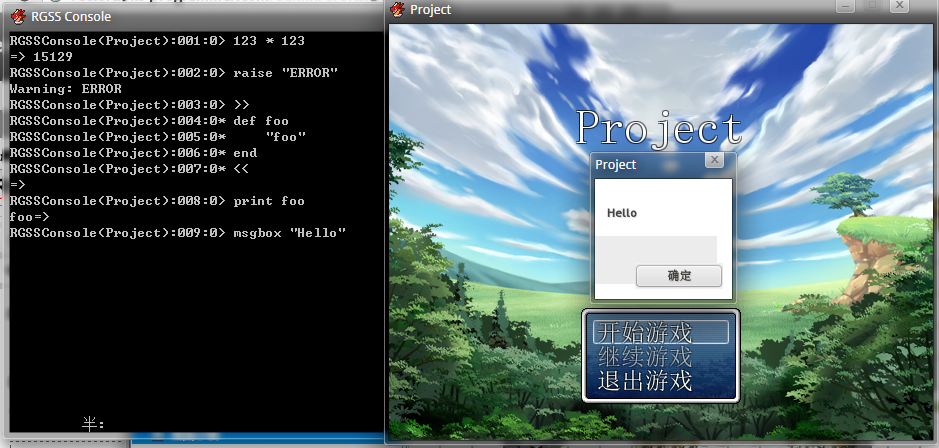
RGSS3的一个小小的控制台,可以即时输入脚本运行- -

在控制台内输入 >> 可开启多行模式,再次输入 << 即可关闭.
下面扔代码:
#===============================================================================
# RGSS Console by Vctor29
#-------------------------------------------------------------------------------
# last update : 2012/2/6 22:43
#===============================================================================
RGSSConsole = Thread.new do
DataManager.load_normal_database
$RGSSConsoleLine = 1
def msgbox(message)
$msgbox ||= Win32API.new("user32", "MessageBox", "pppi", "i")
$msgbox.call(0, message, $data_system.game_title, 0)
end
loop do
begin
print "RGSSConsole(#{$data_system.game_title}):#{$RGSSConsoleLine.to_s.rjust(3 ,'0') if $RGSSConsoleLine < 1000}:0> "
$RGSSConsoleLine += 1
line = gets
if line == ">>\n"
prog = ""
loop do
print "RGSSConsole(#{$data_system.game_title}):#{$RGSSConsoleLine.to_s.rjust(3 ,'0') if $RGSSConsoleLine < 1000}:0* "
$RGSSConsoleLine += 1
line = gets
if line == "<<\n"
break
end
prog << line
end
line = prog
end
print("=> ", eval(line, TOPLEVEL_BINDING), "\n")
rescue SyntaxError, LoadError, StandardError
STDERR.puts "Warning: #$!"
end
end
end

#===============================================================================
# PixelText by Vctor29
#-------------------------------------------------------------------------------
# last update : 2012/2/5 18:56
#===============================================================================
class PixelText < Sprite
def initialize(x, y, text)
super()
self.x = x
self.y = y
self.bitmap = Bitmap.new(1000, 1000)
self.bitmap.font = Font.new("方正像素12", 48)
self.bitmap.draw_text(x, y, 1000, 96, text)
self.zoom_x = 12 / 48.0
self.zoom_y = 12 / 48.0
end
end
使用方法:
text = PixelText.new(x, y, text)
这个可以实现精灵移动到目的地时按照曲线轨迹移动,没错,Bézier curve曲线 - -
下面这图虽说显得寒酸了,不过用起来还是挺.....妖娆的...

下面是贝塞尔曲线类的代码:
#===============================================================================
# Bézier curve by Vctor29
#-------------------------------------------------------------------------------
# last update : 2012/2/3 23:06
#===============================================================================
class Bezier
attr_accessor :paths
attr_accessor :curve
def initialize
@paths = []
@curve = []
@total = 0
end
def add(x, y)
@paths << {x: x,y: y}
end
def paths2curve
inc = 0.002 # 精度
x = @paths[0][:x]
y = @paths[0][:y]
t = inc
temp_point = {x: 0, y: 0}
dx = 0
dy = 0
dist = 0
for n in 0..(@paths.size - 4)
t = inc
while t <= 1
temp_point = self.format(t, @paths[n], @paths[n + 1], @paths[n + 2], paths[n + 3])
dx = temp_point[:x] - x
dy = temp_point[:y] - y
dist = Math.hypot(dx, dy)
if dist >=1
@curve << temp_point
x = temp_point[:x]
y = temp_point[:y]
end
t += inc
end
end
@total = @curve.size
end
def format(t,p0,p1,p2,p3)
out = {x: 0, y: 0}
t2 = t ** 2
t3 = t ** 3
out[:x] = 0.5 * (2 * p1[:x] + (-p0[:x] + p2[:x]) * t + (2 * p0[:x] - 5 * p1[:x] + 4 * p2[:x] - p3[:x]) * t2 + (-p0[:x] + 3 * p1[:x] - 3 * p2[:x] + p3[:x]) * t3)
out[:y] = 0.5 * (2 * p1[:y] + (-p0[:y] + p2[:y]) * t + (2 * p0[:y] - 5 * p1[:y] + 4 * p2[:y] - p3[:y]) * t2 + (-p0[:y] + 3 * p1[:y] - 3 * p2[:y] + p3[:y]) * t3)
return out
end
end
以下是测试代码:
#===============================================================================
# Main
#===============================================================================
object = Sprite.new
object.bitmap = Bitmap.new(22, 22)
object.bitmap.draw_text(0, 0, 22, 22, "■")
object.ox = 11
object.oy = 11
object.x = 0
object.y = 0
back = Sprite.new
back.bitmap = Bitmap.new(640,480)
curve = Bezier.new
color = Color.new(255, 255, 255)
12.times do
curve.add(rand(544), rand(416))
end
curve.paths2curve
object.x = curve.curve[0][:x]
object.y = curve.curve[0][:y]
#object.angle = Math.atan2(curve.curve[1][:y] - object.y, curve.curve[1][:x] - object.x) / (Math::PI / 180) - 90
now = 0
for i in 0...curve.curve.size
back.bitmap.set_pixel(curve.curve[i][:x], curve.curve[i][:y], color)
end
loop do
for i in 0..curve.curve.size
object.x = curve.curve[i][:x]
object.y = curve.curve[i][:y]
#object.angle = Math.atan2(curve.curve[i + 1][:y] - object.y, curve.curve[i + 1][:x] - object.x) / (Math::PI / 180) - 90
Graphics.update
end
curve.curve.reverse!
end
偶然间发现RGSS3内部定义了Complex类,于是拿他画了个Julia集.
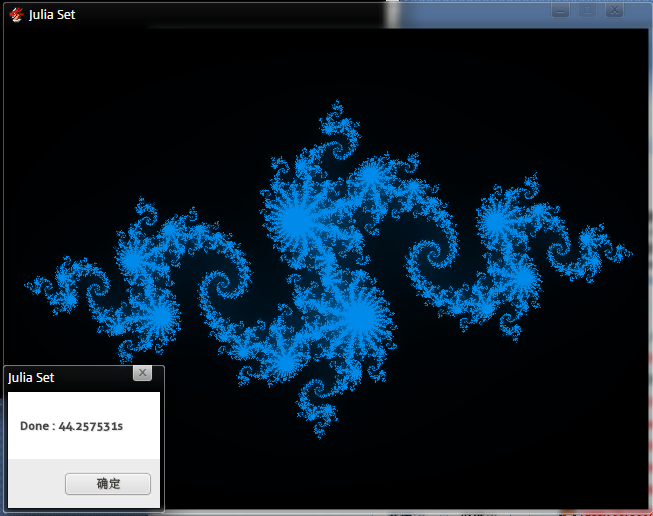
你们也知道RGSS3的效率...

以下为代码:
#===============================================================================
# Julia Set by Vctor29
#-------------------------------------------------------------------------------
# last update : 2012/2/3 23:06
#===============================================================================
Graphics.resize_screen(640, 480)
$sprite = Sprite.new
$sprite.bitmap = Bitmap.new(640, 480)
z = Complex(0, 0)
c = Complex(-0.8, 0.156)
t = Time.now
for x in 0..640
Graphics.update
for y in 0..480
z = Complex(-1.6 + x / 200.0, -1.2 + y / 200.0)
for k in 0..180
if z.real * z.real + z.imag * z.imag > 4.0
break
end
z = z * z + c
end
$sprite.bitmap.set_pixel(x, y, Color.new(0, k / 1.3, k * 1.3))
end
end
msgbox "Done : #{Time.now - t}s"
loop {Graphics.update}
puts "Hello World!"